

Internal Linking Best Practices Boost Your SEO Strategy
- Justin Gleo

- Mar 1, 2025
- 9 min read
Internal linking is a vital part of SEO. It helps users and search engines navigate your site.
Understanding internal linking best practices can greatly improve your website's performance. By strategically linking your content, you not only enhance user experience but also boost your site's SEO. Internal links guide visitors through your website, keeping them engaged longer. They also distribute page authority across your site, helping important pages rank higher in search results.
With effective internal linking, you can ensure your website's structure is robust and easy to navigate. This blog will uncover the best practices for internal linking to help you optimize your site and improve its visibility. Let's dive into how you can make the most out of internal links.
Introduction To Internal Linking
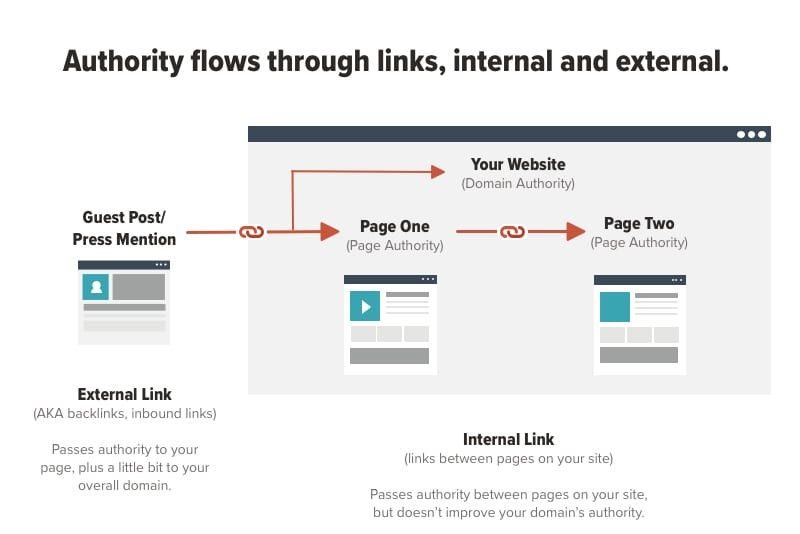
Internal linking is a crucial part of website optimization. It connects different pages within the same domain. This practice helps users navigate your site. It also distributes page authority and ranking power.
Internal links are hyperlinks that point to another page on the same website. They differ from external links, which direct users to a different domain. Proper internal linking improves user experience and site structure.
Importance Of Internal Links
Internal links guide users through your site. They help users find related content. This keeps visitors on your site longer. It reduces bounce rates and improves engagement.
These links also help search engines understand your website. They reveal the structure and hierarchy of your content. This helps search engines index your pages better.
Seo Benefits
Internal links can boost your SEO efforts. They pass link equity between pages. This helps lower-ranked pages gain authority. Search engines use internal links to crawl your site. This improves the visibility of all your pages. It ensures no page is left unnoticed.
Internal linking also helps with keyword relevance. Linking related pages with keywords can improve their rankings. It signals to search engines that these pages are important.
Creating An Internal Linking Strategy
Internal linking is crucial for effective SEO. It helps search engines understand your site's structure. It also keeps visitors engaged. A good internal linking strategy can improve your site's visibility. It can also boost your rankings. Let's explore some best practices for creating an internal linking strategy.
Planning Your Structure
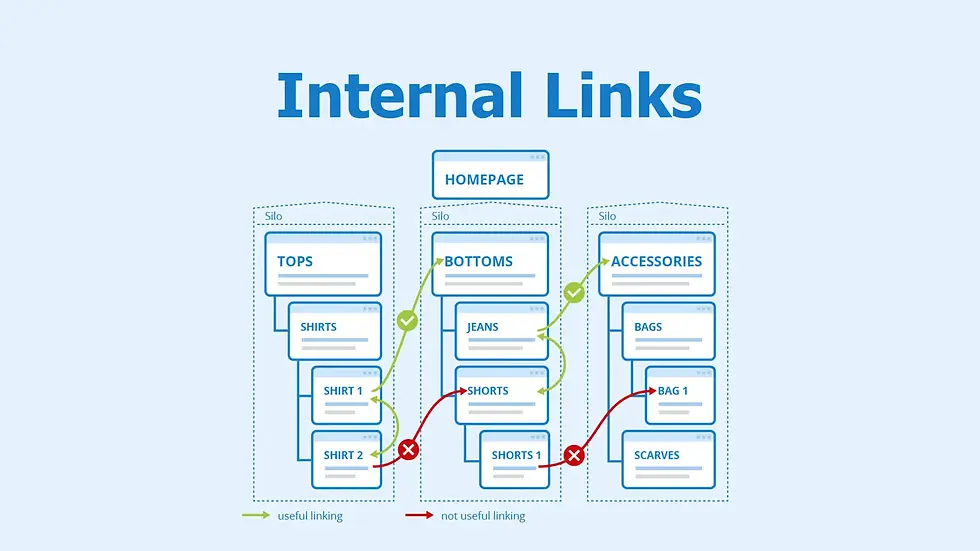
First, plan your site's structure. Think of your site as a pyramid. At the top is your homepage. Below it are your main categories. Under those are subcategories and individual pages. Make sure each level links to the one above and below. This helps search engines crawl your site. It also makes navigation easier for users.
Use a clear hierarchy. Place important pages at higher levels. Less important pages go lower. Keep links relevant. Link related content to each other. This improves user experience. It also helps with SEO.
Setting Goals
Set clear goals for your internal linking strategy. Decide what you want to achieve. Do you want to improve user engagement? Increase page views? Boost rankings for specific pages? Your goals will guide your strategy.
Track your progress. Use tools like Google Analytics. Monitor metrics like bounce rate and average session duration. Adjust your strategy based on the data. Keep refining your approach. This will help you achieve your goals.
Choosing Anchor Text
Choosing the right anchor text is crucial for effective internal linking. Anchor text is the clickable text in a hyperlink. It helps search engines and users understand the context of the linked page. The right anchor text can boost your SEO efforts and improve user experience.
Relevance And Keywords
Ensure the anchor text is relevant to the linked content. Use words that describe the topic of the target page. Including keywords in your anchor text can enhance SEO. But, make sure the keywords fit naturally within the text.
Choose specific and descriptive words. This helps both users and search engines understand the link's purpose. Avoid using generic phrases like "click here" or "read more". These do not provide any context about the linked content.
Avoiding Over-optimization
Using the same anchor text repeatedly can lead to over-optimization. This might trigger search engine penalties. Vary your anchor text to keep it natural and diverse. Mix up the keywords and phrases. Use synonyms or related terms to maintain a natural flow.
This not only helps in avoiding penalties but also makes the content more engaging. Remember, the goal is to make the anchor text helpful and informative. It should guide users to valuable content without seeming forced or repetitive.
Linking To High-value Pages
Internal linking plays a crucial role in optimizing your website's SEO. One of the best practices is linking to high-value pages. These are the pages that bring the most benefit to your site. They can include your top-performing content, key landing pages, or important product pages. Proper internal linking to these high-value pages can boost their visibility and authority.
Identifying Key Pages
First, you need to identify your key pages. These are the pages that provide the most value to your audience. Look for pages with high traffic, engagement, or conversion rates. You can use analytics tools to find these pages. Once identified, these pages should be your primary focus for internal linking.
Prioritizing Content
Next, prioritize your content for internal linking. Not all content holds the same value. Focus on linking to content that is highly relevant and valuable. This can include blog posts, guides, or case studies. By doing so, you ensure that your audience finds the most important information easily.
Linking to high-value pages not only improves SEO but also enhances user experience. It helps users navigate your site more efficiently. So, make sure to regularly review and update your internal links.

Using Natural Links
Internal linking is a crucial part of SEO. Using natural links enhances the user experience and boosts your website's search engine rankings. Natural links fit seamlessly into your content, making them more effective and user-friendly.
Contextual Linking
Contextual linking means placing links within the text of your content. These links should be relevant to the surrounding text. This practice helps search engines understand the context of the linked page. It also provides value to your readers by guiding them to related information.
● Choose anchor text that matches the linked content.
● Avoid generic phrases like "click here" or "read more.
● Ensure the linked content is relevant and adds value.
User Experience
Natural links improve user experience by making navigation easier. When readers find relevant links within the content, they stay longer on your site. This reduces bounce rates and increases engagement.
Practice | Benefit |
Use clear, descriptive anchor text | Helps users understand the link's destination |
Link to relevant pages only | Keeps users engaged and provides value |
Ensure links open in the same tab | Prevents disrupting the user’s experience |
Good internal linking practices are essential for SEO and user satisfaction. By using natural links, you create a seamless and informative experience for your readers.
Balancing Link Distribution
Balancing link distribution is crucial for effective internal linking. It helps ensure a seamless user experience and improves SEO performance. By distributing links evenly across your website, you can guide users through your content logically and keep them engaged.
Avoiding Link Hoarding
Avoid placing too many links on a single page. It can overwhelm users and reduce the value of each link. Instead, distribute links across various pages to maintain balance. This approach prevents link hoarding and promotes a better user experience.
Ensuring Even Spread
Ensure that links are spread evenly throughout your content. This helps users navigate your website more efficiently. It also improves the flow of link equity, enhancing your site's SEO. Aim for a natural and logical link distribution. Each link should add value and relevance to the content.
Tracking And Analyzing Links
Tracking and analyzing internal links is crucial for any SEO strategy. It helps you understand which links perform well and which need improvement. Let's delve into the best practices for monitoring and adjusting your internal linking strategy.
Monitoring Performance
Use tools like Google Analytics or Ahrefs to track link performance. These tools provide data on link clicks, user engagement, and page views. Track metrics such as bounce rate, session duration, and conversion rate. This data helps you understand if your links are effective.
Here's a simple table summarizing key metrics to monitor:
Metric | Importance |
Bounce Rate | Shows if users find your content relevant |
Session Duration | Indicates how long users stay on your site |
Conversion Rate | Measures how many users take desired actions |
Adjusting Strategy
If a link isn't performing well, consider changing its anchor text. Relevant keywords in anchor texts can improve link performance. Also, ensure the link context is clear and valuable to the user. This enhances user experience and link effectiveness.
Use the following steps to adjust your strategy:
1. Identify underperforming links using analytics tools.
2. Review the content around these links for relevance and value.
3. Update anchor texts to include more relevant keywords.
4. Reevaluate the placement of links within your content.
Regularly reviewing and adjusting your internal linking strategy ensures continuous improvement. It keeps your content engaging and effective.
Tools For Internal Linking
Internal linking is crucial for SEO success. It helps search engines understand your website's structure and boosts your page's relevance. To make internal linking effective, you need the right tools. This section covers some of the best tools for internal linking.
Seo Plugins
SEO plugins are essential for managing internal links. They offer features like automatic linking suggestions and broken link checks.
Here are some popular SEO plugins:
● Yoast SEO: This plugin suggests relevant internal links as you write. It also provides a link counter to track internal links.
● Rank Math: Rank Math offers internal linking suggestions and a link analysis tool. It helps you identify pages with few or no internal links.
● All in One SEO: This plugin includes a link assistant tool. It suggests internal links and helps you find and fix broken links.
Analytical Tools
Analytical tools help you understand your internal linking structure. They provide insights into link performance and highlight issues.
Here are some useful analytical tools:
● Google Analytics: You can use Google Analytics to track internal link performance. It shows how users navigate your site and which links they click most.
● Google Search Console: This tool helps you find internal link opportunities. It shows the most linked pages and internal link distribution.
● Ahrefs: Ahrefs offers a site audit tool that checks for internal link issues. It highlights broken links and orphaned pages.
Tool | Key Feature
|
Yoast SEO | Automatic linking suggestions |
Rank Math | Link analysis tool |
All in One SEO | Link assistant tool |
Google Analytics | Track internal link performance |
Google Search Console | Internal link distribution |
Ahrefs | Site audit tool |
Using these tools can improve your internal linking strategy. They provide the insights and features you need to optimize your links.
Common Internal Linking Mistakes
Internal linking is crucial for SEO and user experience. Yet, many webmasters make common mistakes that can harm their site's performance. Let’s explore some of these common errors and how to avoid them.
Overlinking
Overlinking occurs when you include too many internal links on a single page. This can confuse readers and dilute the value of each link.
● Aim for quality over quantity. Only link to relevant pages.
● Use varied anchor text. Avoid using the same words repeatedly.
● Ensure links add value and provide additional information.
Too many links can look spammy. Search engines may penalize your site for overlinking. Focus on user experience and meaningful connections.
Ignoring Broken Links
Broken links occur when the linked page no longer exists. These can frustrate users and hurt your SEO.
Action | Reason
|
Regularly check for broken links | Ensure all links are functional |
Use tools like Google Search Console | Identify broken links quickly |
Fix or remove broken links | Maintain a seamless user experience |
Broken links can lead to a poor user experience. They can also impact your site's credibility. Regular checks can help maintain link integrity.
Future Trends In Internal Linking
Internal linking is a crucial aspect of SEO strategy. As digital landscapes evolve, so do the methods and tools for internal linking. Understanding future trends can help you stay ahead in optimizing your website.
Ai And Automation
AI and automation are shaping the future of internal linking. AI can analyze user behavior to suggest the best internal links. Automation tools streamline the process, saving time and effort. These tools can identify broken links and suggest relevant internal links. AI-powered tools can also help in understanding content relevance. They ensure your internal links are logical and useful.
Evolving Best Practices
Internal linking practices are constantly changing. Search engines refine their algorithms regularly. Keeping up with these changes ensures your strategy remains effective. Use descriptive anchor texts. This helps users and search engines understand the linked content. Avoid overusing keywords in your anchor texts. Focus on user experience when creating internal links. Ensure your links provide value and context.

Frequently Asked Questions
What Is Internal Linking?
Internal linking refers to linking one page of a website to another page on the same site. It helps users navigate and improves SEO.
Why Are Internal Links Important For Seo?
Internal links help search engines understand your site's structure. They distribute page authority and improve indexing, which boosts SEO performance.
How Many Internal Links Should I Use?
There's no strict rule, but aim for natural and user-friendly linking. Generally, 2-5 internal links per 1000 words is recommended.
Can Internal Linking Improve User Experience?
Yes, internal linking enhances user navigation, keeps visitors engaged, and helps them find related content. This improves overall user experience.
Conclusion
Internal linking is crucial for SEO success. It helps search engines and users. Keep links relevant and natural. Use descriptive anchor text. Avoid excessive linking. Regularly review and update links. Effective internal linking improves site structure. It also enhances user experience. Follow these best practices for better SEO results. Happy linking!
Let’s Build Your Success Together
Don’t wait for results to happen—create them. With URDigital Tech, you’re not just getting a service; you’re gaining a partner invested in your success.
Email us at: solutions@urdigitaltech.com
Text us at: (716) 400-0769
Contact us today to see how we can help you turn ideas into impact and opportunities into achievements.


Comments