

Hreflang Tag Implementation Guide Boost Your Global SEO
- Justin Gleo

- Feb 27, 2025
- 7 min read
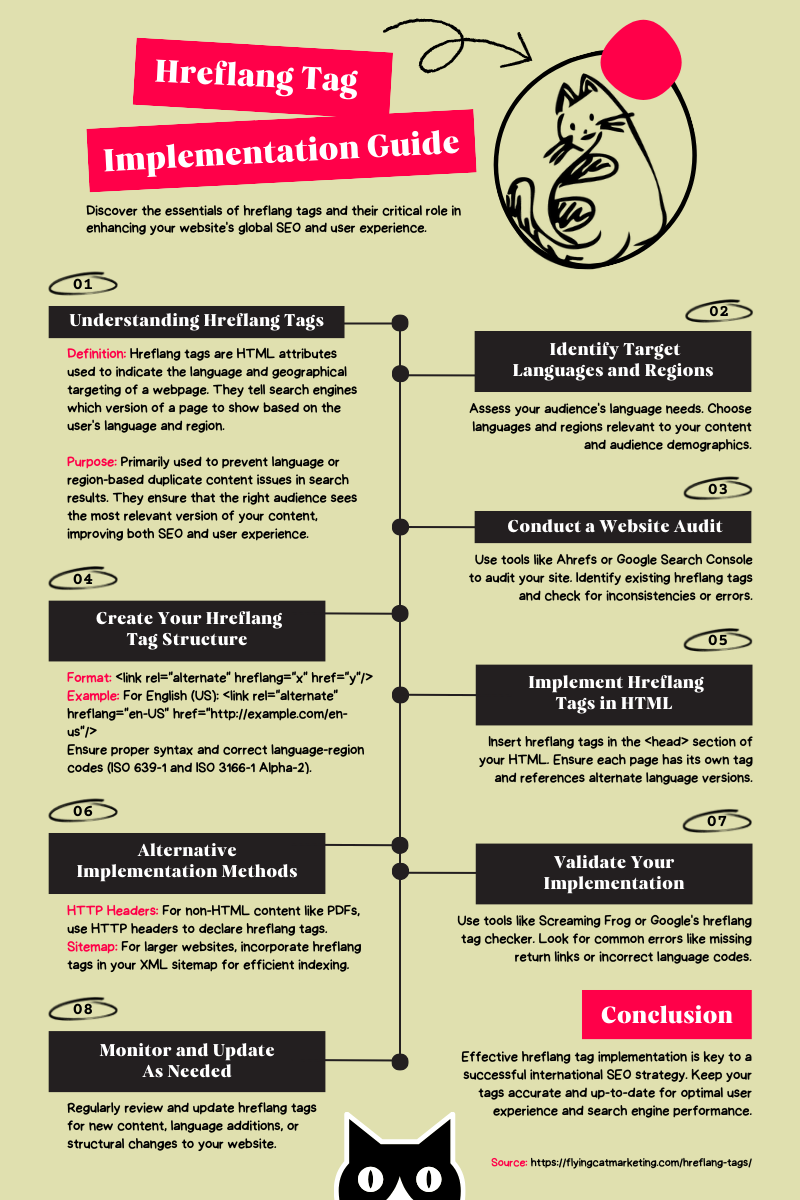
Understanding hreflang tags is crucial for international SEO. These tags tell search engines the language and region of your webpage.
In this guide, you will learn about hreflang tag implementation. This helps ensure your content reaches the right audience in their preferred language. Proper use of hreflang tags can boost your site's visibility in different regions. This guide covers the basics and offers practical steps.
Even if you're new to SEO, you'll find this information accessible and useful. By the end, you'll know how to implement hreflang tags effectively. Let's dive in and make your website more user-friendly across the globe.

Introduction To Hreflang Tags
Hreflang tags are important for websites with global audiences. These tags help search engines understand which version of your website to show based on the user's language and region. Implementing hreflang tags correctly can improve your website's visibility and user experience.
What Are Hreflang Tags?
Hreflang tags are HTML attributes used to specify the language and geographical targeting of a webpage. They help search engines serve the correct version of a page to users.
Here's a basic example of a hreflang tag:
This tag tells search engines that the page is in English. Different versions of a page need different hreflang tags.
Importance For Global Seo
Hreflang tags are crucial for global SEO. They ensure users see the right content for their language and region.
● Improved User Experience: Users get content in their preferred language.
● Reduced Bounce Rate: Users are less likely to leave if they understand the content.
● Better SEO Performance: Correct hreflang tags help avoid duplicate content issues.
Using hreflang tags correctly can boost your website's global reach. They help search engines deliver the most relevant content to users worldwide.
Benefits Of Using Hreflang Tags
Hreflang tags are essential for websites targeting multiple languages or regions. They help search engines understand the language and regional targeting of a page. By using hreflang tags, websites can offer significant benefits that enhance user experience and website performance.
Improved User Experience
Hreflang tags help users find content in their preferred language. Users feel more comfortable navigating a website in their native language. This leads to a more pleasant browsing experience. Correct language targeting shows users that you value their needs. Happy users are likely to stay longer on your site and explore more pages.
Reduced Bounce Rates
Users often leave websites quickly if they cannot understand the content. Hreflang tags ensure users land on pages in their preferred language. This reduces confusion and frustration. Lower bounce rates can improve your site's overall performance. Users are more likely to engage with content they understand. This can lead to higher conversion rates and better user engagement.
Setting Up Hreflang Tags
Setting up hreflang tags is crucial for websites targeting multiple languages or regions. These tags help search engines serve the correct language or regional URL to users. Proper implementation ensures users have a better experience. Here’s a guide on how to set them up effectively.
Html Implementation
For HTML implementation, add the hreflang tags directly into the section of your web pages. This is the most straightforward method.
Here is a sample code to add hreflang tags:
Ensure each page includes a link to itself. For example, the English page should have a hreflang tag pointing to itself.
Use the correct language and region codes. Check the W3C guidelines for the correct codes.
Http Header Implementation
Use HTTP headers for non-HTML files. This method works well for PDFs or media files.
Configure the server to send the hreflang tags in the HTTP header. Here’s an example for an Apache server:
Header set Link "; rel='alternate'; hreflang='en'"Header set Link "; rel='alternate'; hreflang='es'"Header set Link "; rel='alternate'; hreflang='fr'"Header set Link "; rel='alternate'; hreflang='de'"
Ensure each URL has its corresponding hreflang in the HTTP headers. This method helps search engines understand the content's language or region.
Both methods ensure better user experience and improved search engine results. Choose the method that suits your content type.
Common Mistakes To Avoid
Implementing hreflang tags can be tricky. Avoiding common mistakes ensures your website ranks well in multiple languages. This guide highlights frequent errors in hreflang implementation. Follow these tips for better SEO results.
Incorrect Language Codes
Using the wrong language codes is a common mistake. Each language has a specific code. The code must follow the IETF language tag standard. For example, use "en" for English or "fr" for French. Incorrect codes can confuse search engines. This can result in poor indexing and lower rankings.
Language | Correct Code | Incorrect Code |
English | en | eng |
Spanish | es | spa |
German | de | ger |
Always double-check your language codes. This simple step can prevent major issues. Refer to the IETF language tag standard for guidance.
Missing Return Tags
Every hreflang tag must have a return tag. This means each language version must reference the original page. Missing return tags can confuse search engines. This can lead to indexing problems.
● Original page:
● Return tag:
Always ensure your hreflang tags are reciprocal. This helps search engines understand the relationship between pages. Consistent tagging improves site indexing and user experience.
Testing Your Hreflang Tags
Testing your hreflang tags is crucial for ensuring they work correctly. Incorrect tags can lead to poor international SEO. This section will guide you on how to test your hreflang tags effectively.
Using Google Search Console
Google Search Console is a great tool for checking your hreflang tags.
● Open Google Search Console.
● Navigate to International Targeting under the Search Traffic section.
● Check the Hreflang report for any errors or warnings.
The report will show if there are any issues with your hreflang tags. Common errors include missing return links or incorrect language codes. Fix these issues to improve your site's international performance.
Third-party Tools
Several third-party tools can help you test your hreflang tags. These tools can provide more detailed insights.
Tool Name | Features
|
Screaming Frog | Comprehensive hreflang tag analysis and error reporting. |
Ahrefs | Provides hreflang tag checks and overall site health. |
SEMrush | Offers detailed hreflang tag insights and recommendations. |
Using these tools, you can identify and fix any hreflang tag issues. This ensures your international pages are correctly indexed by search engines.

Advanced Hreflang Strategies
Implementing hreflang tags can be complex. Advanced strategies ensure your content reaches the right audience. We will discuss handling regional variants and managing multilingual content.
Handling Regional Variants
Regional variants are crucial for targeting specific areas. For example, Spanish speakers in Spain and Mexico may need different content. Use hreflang tags to differentiate these regions.
Here is an example:
This ensures users in Spain see the Spain version. Users in Mexico see the Mexico version.
Consider the following tips:
● Identify your target regions.
● Create region-specific content.
● Use the correct hreflang tag for each region.
Managing Multilingual Content
Managing multilingual content requires a structured approach. Use hreflang tags to specify language versions. This avoids duplicate content issues and improves user experience.
Consider the following table for clarity:
Language | Hreflang Tag
|
English |
|
French |
|
German |
|
Follow these steps:
1. Translate your content into the target languages.
2. Implement hreflang tags for each language version.
3. Ensure your site structure supports multiple languages.
Using these advanced strategies helps you reach a global audience. It also improves your search engine rankings.
Monitoring And Maintenance
Effective monitoring and maintenance of hreflang tags ensure that your website’s international SEO remains strong. Regular checks and updates prevent issues that could affect your site's visibility in different regions.
Regular Audits
Conducting regular audits is essential for maintaining hreflang tags.
Here’s a simple audit checklist:
● Verify that each page has the correct hreflang tags.
● Ensure hreflang tags are pointing to the right URLs.
● Check for any missing or incorrect hreflang attributes.
● Use Google Search Console to identify hreflang issues.
Run these audits quarterly to catch and fix issues early. This keeps your international SEO strategy on track.
Updating Tags As Needed
Hreflang tags need updates as your website evolves.
Follow these steps to keep them current:
1. Review your hreflang tags whenever you add new content.
2. Update tags if you change page URLs.
3. Monitor changes in target languages and regions.
4. Ensure correct language codes and region codes.
Use a version control system to track hreflang tag changes. This helps you revert to a previous state if needed. Maintaining accurate hreflang tags helps search engines understand your site’s structure. This boosts your visibility in different markets.

Case Studies And Examples
The Hreflang Tag is essential for multilingual SEO. It ensures search engines serve the correct language version of a webpage. Understanding its implementation through case studies can be incredibly beneficial. Below, we explore some successful implementations and lessons learned from real-world examples.
Successful Implementations
Many companies have successfully implemented Hreflang tags. Let’s take a look at a few:
Company | Strategy | Result |
Zalando | Used Hreflang tags for multiple European languages | Increased organic traffic by 40% |
Airbnb | Implemented Hreflang for over 30 languages | Improved user experience and reduced bounce rate |
Utilized Hreflang for global reach | Enhanced search visibility and user satisfaction |
Lessons Learned
There are several lessons we can learn from these implementations.
Here are some key takeaways:
● Consistency: Ensure Hreflang tags are consistent across all pages.
● Validation: Regularly validate your Hreflang tags using tools like Google Search Console.
● Sitemap Integration: Include Hreflang tags in your XML sitemap for better indexing.
● Testing: Always test Hreflang tags on a staging site before going live.
By learning from these examples, you can implement Hreflang tags effectively. This will help you serve the right content to the right audience. Start by analyzing these strategies and apply them to your website.
Frequently Asked Questions
What Is A Hreflang Tag?
A hreflang tag is an HTML attribute. It tells search engines the language and region of a webpage.
Why Use Hreflang Tags?
Hreflang tags help serve the correct language or regional version of a webpage. This improves user experience and SEO.
How To Implement Hreflang Tags?
Implement hreflang tags in the HTML head section. Use the format.
What Are Common Hreflang Tag Errors?
Common errors include incorrect language codes, missing return tags, and wrong URLs. Always validate your hreflang tags.
Conclusion
Implementing hreflang tags can enhance your site's user experience and search ranking. Correct usage ensures content reaches the right audience, avoiding language barriers. Stay consistent with hreflang tag syntax to prevent errors. Regularly monitor and update tags for accuracy.
Following this guide helps improve international SEO efforts. Keep learning and adapting to optimize your website’s global reach. Proper hreflang implementation is a valuable tool in your SEO strategy. Happy optimizing!
Let’s Build Your Success Together
Don’t wait for results to happen—create them. With URDigital Tech, you’re not just getting a service; you’re gaining a partner invested in your success.
Email us at: solutions@urdigitaltech.com
Text us at: (716) 400-0769
Contact us today to see how we can help you turn ideas into impact and opportunities into achievements.


Comments