

Creating a Frictionless Checkout Experience Boost Sales Effortlessly
- Justin Gleo

- Jan 30, 2025
- 9 min read
A frictionless checkout experience is key to keeping customers happy. It reduces cart abandonment and boosts sales.
In today's fast-paced world, consumers expect quick and easy online shopping. They want to find products, add them to their cart, and check out without hassle. A smooth, easy checkout process can make all the difference. It keeps customers coming back and builds trust in your brand.
But how do you create such an experience? It's not just about a simple design. It's about understanding customer needs and removing obstacles. This blog will explore the essential elements of a frictionless checkout experience. From clear calls-to-action to seamless payment options, we'll cover it all. Let's dive in!
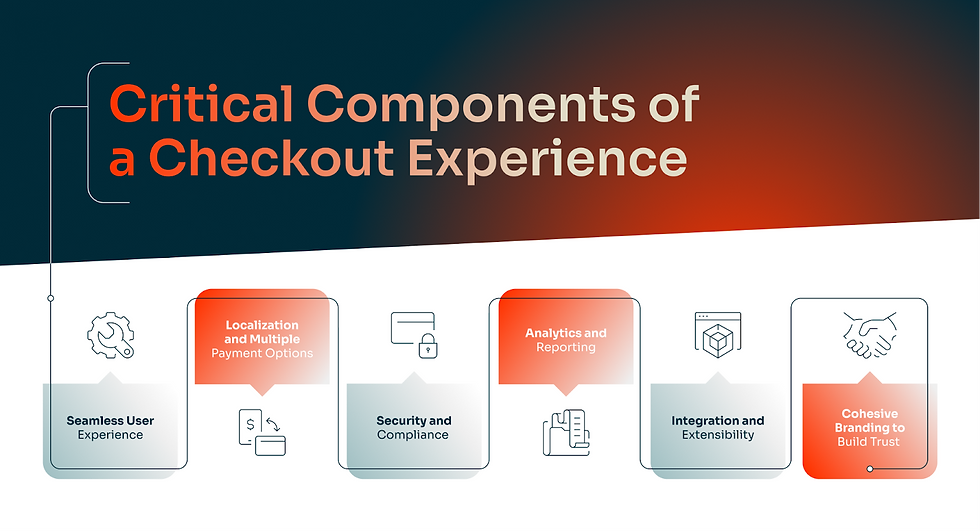
Importance Of Seamless Checkout
Creating a smooth checkout experience is crucial for any online store. It directly affects your sales and customer satisfaction. Shoppers expect a quick and easy process. A complicated checkout can lead to cart abandonment. This means lost sales and unhappy customers. Let's look at how a seamless checkout impacts your business.
Impact On Sales
A streamlined checkout process can greatly increase your sales. Customers want a quick and easy shopping experience. If the checkout is difficult, they might leave without buying. Studies show that a simple checkout can reduce cart abandonment. This means more completed sales and higher revenue.
Here are some ways a seamless checkout can boost sales:
● Fewer steps: Reduce the number of steps to complete a purchase.
● Guest checkout: Allow customers to buy without creating an account.
● Multiple payment options: Offer various payment methods to suit all customers..
Customer Satisfaction
A smooth checkout process also improves customer satisfaction. Happy customers are more likely to return. They may also recommend your store to others. A seamless checkout shows that you value their time. This builds trust and loyalty.
Consider these elements for a satisfying checkout experience:
1. Clear instructions: Provide clear steps and instructions.
2. Fast loading times: Ensure your checkout pages load quickly.
3. Mobile-friendly design: Optimize for mobile devices.
By focusing on a seamless checkout, you can improve both sales and customer satisfaction. It's a win-win for your online store.

Simplifying The Checkout Process
Creating a frictionless checkout experience is crucial for maximizing conversions. Simplifying the checkout process is a key strategy. Customers expect quick and easy transactions. A streamlined checkout process reduces cart abandonment and increases customer satisfaction. Here are some effective ways to simplify the checkout process.
Minimize Steps
Reducing the number of steps in your checkout process is essential. Each additional step can lead to cart abandonment. Aim for a one-page checkout if possible. This keeps customers engaged and reduces distractions.
Consider using a progress bar. This helps customers see where they are in the process. It also makes the checkout feel quicker. Break down the steps into simple, easy-to-follow sections.
For example:
● Personal Information
● Shipping Details
● Payment Information
● Order Review
Minimizing steps ensures a smooth and quick transaction. This keeps customers happy and encourages repeat business.
Autofill Forms
Implementing autofill forms can significantly speed up the checkout process. Autofill uses saved customer information. This reduces the time needed to complete forms.
Here are some benefits of autofill:
Benefit | Explanation |
Speed | Faster form completion with saved data. |
Accuracy | Reduces typing errors. |
Convenience | Customers appreciate not having to re-enter info. |
Ensure that your forms are compatible with browser autofill features. This enhances the customer experience. It also reduces friction during checkout.
Mobile-friendly Design
Creating a frictionless checkout experience is vital for any e-commerce platform. A key component of this is a mobile-friendly design. As more users shop via smartphones, ensuring your checkout process is smooth on mobile devices is crucial. Here, we will discuss important aspects of mobile-friendly design.
Responsive Layouts
A responsive layout automatically adjusts to different screen sizes. This ensures a seamless experience whether on a desktop, tablet, or smartphone. Below are key features of a responsive layout:
● Fluid grid system
● Flexible images
● Media queries
These features ensure the content is easily readable and navigable. Users can complete their purchases without any hassle.
Mobile Payment Options
Offering a variety of mobile payment options can significantly ease the checkout process.
Here are some popular mobile payment methods:
Payment Method | Description |
Apple Pay | Allows users to pay with their Apple devices. |
Google Pay | Enables payments through Android devices. |
PayPal | A popular online payment system. |
These payment options streamline the process, making it quick and easy for mobile users to complete their purchases.
Guest Checkout Options
Creating a frictionless checkout experience is vital for e-commerce success. Guest checkout options play a crucial role in this process. They offer a simple and quick way for customers to complete their purchases without creating an account. This convenience can lead to higher conversion rates and customer satisfaction.
Advantages Of Guest Checkout
Guest checkout offers several benefits for both customers and businesses. It reduces the time required to complete a purchase. Customers can quickly enter their details and finalize their orders. This simplicity appeals to those who prefer not to create an account.
Another advantage is privacy. Some customers may not want to share personal information. Guest checkout allows them to shop without sharing unnecessary details. This can build trust and encourage repeat purchases. For businesses, guest checkout can lead to increased sales.
By removing the need for account creation, you reduce the risk of cart abandonment. More completed transactions mean higher revenue and growth.
Minimizing Barriers
To create a seamless guest checkout experience, minimize barriers. Simplify the checkout form. Ask only for essential information. Long forms can frustrate customers and lead to abandonment.
Ensure the checkout process is mobile-friendly. Many customers shop on their phones. A responsive design ensures a smooth experience on any device. Speed is also crucial. Optimize your site for fast loading times. Slow sites can deter customers from completing their purchases.
Offer multiple payment options. Different customers prefer different methods. Providing choices like credit cards, PayPal, or digital wallets can cater to more shoppers.
By focusing on these areas, you can create a frictionless guest checkout experience. This will enhance customer satisfaction and boost sales.
Multiple Payment Methods
Creating a frictionless checkout experience is crucial for online retailers. One of the key elements is offering multiple payment methods. This ensures customers can complete their purchases easily and quickly. By providing various payment options, you cater to different preferences and increase the likelihood of successful transactions.
Credit/debit Cards
Credit and debit cards are the most popular payment methods. They are widely accepted and convenient for most shoppers. To optimize the checkout process, ensure your website supports major card networks like Visa, MasterCard, and American Express. Display trust signals, such as secure payment icons, to assure customers their information is safe.
Card Network | Benefits |
Visa | Global acceptance, secure transactions |
MasterCard | Widespread use, reliable |
American Express | High spending limits, customer rewards |
Digital Wallets
Digital wallets are becoming increasingly popular. They offer speed and convenience for online shopping. Examples include PayPal, Apple Pay, and Google Wallet. By integrating digital wallets into your checkout process, you simplify payment. This can reduce cart abandonment rates.
● PayPal: Known for its strong buyer protection.
● Apple Pay: Offers quick payments with Face ID or Touch ID.
● Google Wallet: Allows easy payments using saved card information.
Offering multiple payment methods can significantly improve the customer experience. Make sure to include popular options and secure transactions. This will help build trust and increase conversion rates.

Security And Trust Signals
Creating a frictionless checkout experience is vital for any online store. A key element in this process is ensuring security and trust signals. These signals reassure customers that their personal and financial information is safe. This builds trust and encourages them to complete their purchase. Here, we will discuss two important trust signals: SSL certificates and trust badges.
Ssl Certificates
SSL certificates are essential for securing online transactions. They encrypt data between your customer's browser and your server. This prevents hackers from accessing sensitive information. Websites with SSL certificates display a padlock icon in the address bar. This visual cue signals that the site is secure.
SSL certificates also improve your site's SEO ranking. Google favors websites with SSL certificates, making them more visible in search results. Here's a simple table to highlight the benefits of SSL certificates:
Benefits | Description
|
Data Encryption | Protects sensitive information from being intercepted. |
SEO Improvement | Boosts search engine ranking. |
Trust Signal | Reassures customers with a visible padlock icon. |
Trust Badges
Trust badges are another way to build customer confidence. They are symbols or logos that indicate your site is secure and trustworthy. Common examples include badges from Norton, McAfee, and PayPal. Trust badges can be placed at various points in the checkout process.
Here are some tips on where to use them:
● On the homepage
● On the product pages
● At the checkout page
Using trust badges effectively can reduce cart abandonment rates. Customers feel more secure knowing their information is protected.
Here's a quick list of popular trust badges and their benefits:
1. Norton Secured: Ensures data protection and site security.
2. McAfee Secure: Indicates a site is free from malware and viruses.
3. PayPal Verified: Shows that your site is verified by PayPal.
Reducing Cart Abandonment
Creating a frictionless checkout experience is crucial for any online store. One key aspect is reducing cart abandonment. Many customers leave without completing their purchase. This can be due to various reasons like unexpected costs, complicated processes, or doubts about the purchase. Here, we will explore effective strategies to reduce cart abandonment and boost your conversion rates.
Exit-intent Popups
Exit-intent popups are a powerful tool to capture customers before they leave. These popups appear when a user is about to close the browser or navigate away. They are designed to re-engage the customer and encourage them to complete their purchase. Consider offering a discount or a special offer in your exit-intent popup. This can motivate the customer to stay and buy.
Here are some tips for creating effective exit-intent popups:
● Use clear, concise language.
● Highlight the value or benefit.
● Include a strong call-to-action (CTA).
By implementing exit-intent popups, you can significantly reduce cart abandonment and retain more customers.
Email Reminders
Email reminders are another effective strategy to reduce cart abandonment. When a customer leaves items in their cart, send them an email to remind them about their pending purchase. This gentle nudge can bring them back to your store.
Consider these elements for your email reminders:
1. Personalize the email with the customer's name.
2. Include a list of the items left in the cart.
3. Offer a limited-time discount or free shipping.
4. Use a clear and engaging subject line.
Here's an example of an email reminder template:
Subject: Don't forget your items! Complete your purchase now.Body:Hi [Customer Name],We noticed you left some items in your cart. Don't miss out on these great products!- [Item 1]- [Item 2]- [Item 3]Complete your purchase now and enjoy a special discount!Best regards,[Your Store Name]
By sending timely and personalized email reminders, you can encourage customers to return and finish their purchase.
Post-purchase Engagement
Creating a frictionless checkout experience does not end at the transaction. Post-purchase engagement is essential to build trust and loyalty. It helps ensure your customers feel valued and informed.
Order Confirmation
An immediate order confirmation reassures your customers. It tells them their purchase was successful. Send an email with all the details of their order. Include the product, quantity, price, and expected delivery date. This transparency builds trust and reduces anxiety.
Customer Feedback
Asking for customer feedback shows you care. It also provides valuable insights. Send a follow-up email asking for their opinion. Keep the survey short and simple. Use their feedback to improve your services.
Frequently Asked Questions
What Is A Frictionless Checkout Experience?
A frictionless checkout experience is smooth, quick, and hassle-free. It reduces obstacles during the purchase process, ensuring customer satisfaction and retention.
How Can You Simplify The Checkout Process?
Simplify the checkout process by minimizing steps, offering multiple payment options, and using auto-fill features. This reduces friction and increases conversion rates.
Why Is A Frictionless Checkout Important?
A frictionless checkout is important because it enhances user experience. It reduces cart abandonment rates and boosts sales and customer loyalty.
What Role Does Mobile Optimization Play In Checkout?
Mobile optimization ensures a seamless checkout on all devices. It improves user experience, reduces friction, and increases mobile conversions.
Conclusion
Creating a frictionless checkout experience is crucial for customer satisfaction. Simplify the process to reduce cart abandonment. Use clear calls-to-action and minimize form fields. Offer multiple payment options for convenience. Ensure your site is mobile-friendly. Fast loading times are essential.
Regularly test your checkout process for smooth transactions. Keep customers informed with order updates. A seamless checkout builds trust and boosts sales. Implement these tips to enhance your checkout experience. Happy customers are more likely to return.
Let’s Build Your Success Together
Don’t wait for results to happen—create them. With URDigital Tech, you’re not just getting a service; you’re gaining a partner invested in your success.
Email us at: solutions@urdigitaltech.com
Text us at: (716) 400-0769
Contact us today to see how we can help you turn ideas into impact and opportunities into achievements.


Comments